Connect your music accounts
Confirm the correct Spotify, Apple Music, or YouTube Music public identity, then import from the providers Jovie currently supports in Work.
Before you begin
- A claimed artist profile. Music identity review is in Identity; imports are in Work. Settings → Connections authorizes Google services, not music providers.
- Open Identity
From your artist navigation, open Identity , then choose Suggested. Jovie groups detected public identities for review.
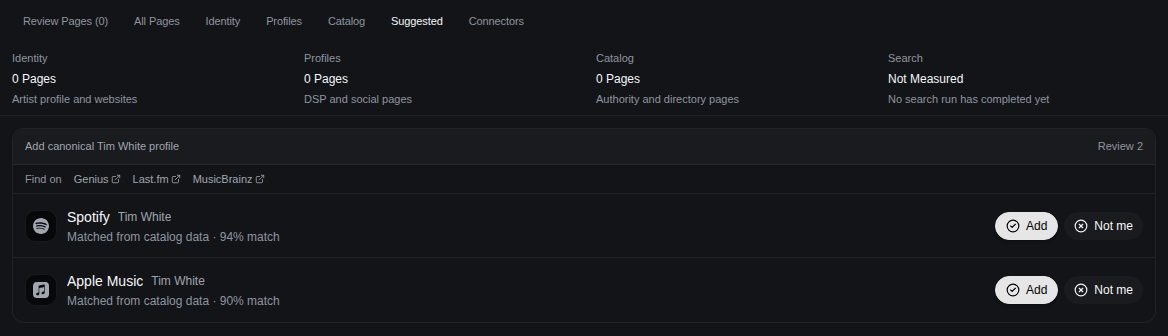
Review detected identities before adding them. - Confirm the exact artist identity
Compare the provider, artist name, destination URL, and catalog. Choose Add only for your artist; choose Not me for a same-name or unrelated result.
- Connect the matching Spotify artist
Spotify is connected during profile claim or initial setup. At Pick the exact Spotify artist, choose the identity that owns the claimed profile; if your claimed profile has no Spotify identity, contact support instead of choosing a nearby result.
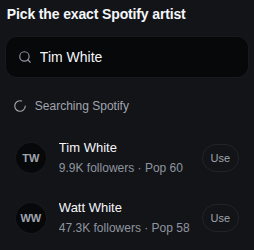
The selected Spotify identity controls which catalog is imported. - Start a supported import
Open Work and choose Add in the toolbar. Use Sync from Spotify when it is available for the connected profile, or Import YouTube (shown as Connect YouTube until the channel is authorized) to authorize and import from your YouTube channel. Spotify, Apple Music, and YouTube Music can appear as detected public identities; Apple Music has no standalone authorization control in the current workspace.
- Let processing finish
Keep the selected identity unchanged while Jovie shows its import or processing state. Review Work when processing completes; Jovie does not promise a fixed completion time.
What happens next
Accepted identities appear in Identity, and supported imported items appear in Work after processing.
Troubleshooting
The suggested artist is wrong
Choose Not me. If a wrong identity is already attached, follow Fix the wrong artist or catalog; do not add another same-name result to compensate.
YouTube asks for permission again
Choose Import YouTube and complete authorization with the channel owner account. If Jovie shows Reconnect YouTube to refresh access, reconnect before retrying the import.
An import stays in progress or fails
Do not switch to another artist identity. Retry the visible provider action once; if it still fails, contact support with the profile URL, provider, and screenshot. No fixed processing-time promise applies.