Find your Jovie profile
Find the public Jovie profile tied to your exact Spotify artist identity without claiming the wrong artist.
- Start with your artist name
On the Jovie landing page, enter the name fans see on Spotify in Search your name, then choose Find me. You can also open Start directly.

Start with the public artist search. - Compare the Spotify results
At Pick the exact Spotify artist, compare the artist name, image, follower count, and popularity. Use Search Spotify artists to make the query more specific.
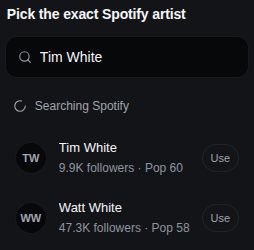
Choose only the Spotify identity you can verify. - Select only a trustworthy match
Choose the row that points to your real Spotify artist page. If none is trustworthy, choose None of These and search again; do not select the nearest name.
- Open the public profile without claiming it
Viewing a result or a public
jov.ie/{username}page does not transfer ownership. A separate Claim Profile, Continue Claim, or Verify & Claim action starts a claim.
What happens next
You can view and share the public profile. To edit an unclaimed profile, complete Claim your profile.
Troubleshooting
No exact result appears
Search the artist name exactly as Spotify displays it, or paste the Spotify artist URL into the Start chat. If Jovie still cannot identify a trustworthy match, stop and contact support.
Several artists have the same name
Open the Spotify pages and compare artwork, releases, genres, and follower counts before selecting one. A shared name alone is not proof.